In this post, we are looking at Microsoft Foundry Managed Virtual Network (MVNet). It has been in public preview for a while, but is now generally available (GA) and supports the new Foundry Agent experience.
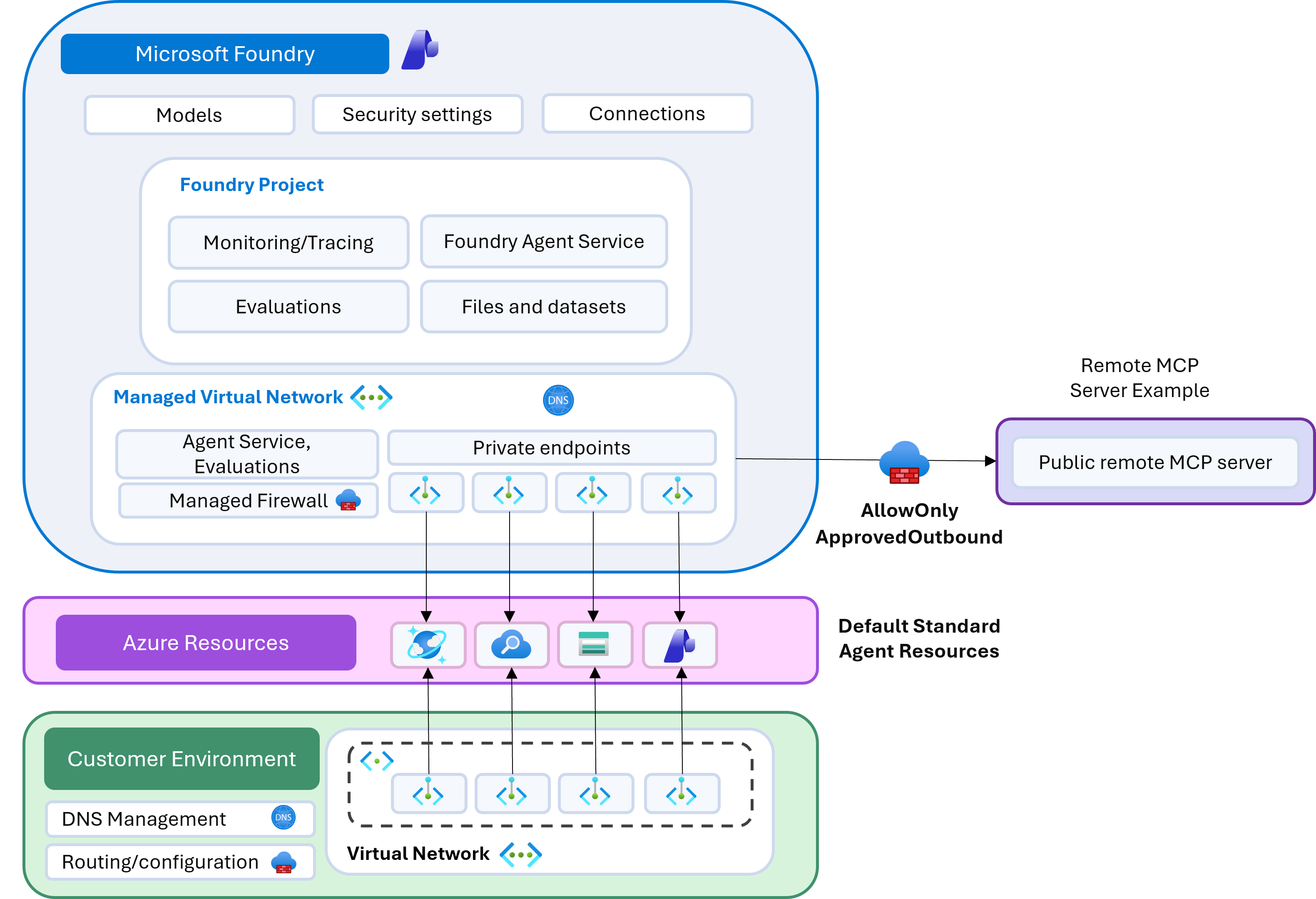
What is the difference between BYO-VNet and MVNet?
At a high level:
- MVNet is Microsoft-managed networking. The virtual network, subnet, and subnet delegation are provisioned in a Microsoft subscription and are not directly visible to you.
- You can still connect to private resources where supported, such as Azure Storage, Azure AI Search, and other supported services.
- Managed Azure Firewall is supported. If you need to restrict outbound traffic from your agent service, you can deploy MVNet with Azure Firewall Basic or Standard.
When controlling egress from your agent service, you will often also need single-tenant resources. This maps well to a standard Foundry setup that uses Azure Storage, Azure AI Search, and Cosmos DB. In that model, private endpoints are created from the managed virtual network to those resources. From your side, you typically only see the private endpoint connections on the target resources.
Recommended deployment reference
To deploy Microsoft Foundry with managed virtual networking and supported resources, I recommend this reference deployment:
By default, this deployment provisions MVNet with Azure Firewall Standard and isolation mode set to AllowOnlyApprovedOutbound.
Checking managed network status and outbound rules
Once deployed, you can confirm the managed network status and outbound rules with:
az cognitiveservices account managed-network show --resource-group demo --name aiservices2rl2Example output:
{
  "id": null,
  "name": null,
  "properties": {
    "managedNetwork": {
      "changeableIsolationModes": [],
      "firewallPublicIpAddress": null,
      "firewallSku": "Standard",
      "isolationMode": "AllowOnlyApprovedOutbound",
      "managedNetworkKind": "V2",
      "networkId": "9f10bbf2-8f62-419b-b4f3-de16adf98c2d",
      "outboundRules": {
        "Connection_aiservices2rl2cosmosdb_sql": {
          "category": "UserDefined",
          "destination": {
            "serviceResourceId": "/subscriptions/baba41cf-c01d-4a55-b6c5-ca494b802be5/resourceGroups/demo/providers/Microsoft.DocumentDB/databaseAccounts/aiservices2rl2cosmosdb",
            "subresourceTarget": "sql"
          },
          "errorInformation": null,
          "fqdns": null,
          "parentRuleNames": null,
          "status": "Active",
          "type": "PrivateEndpoint"
        },
        "Connection_aiservices2rl2search_searchService": {
          "category": "UserDefined",
          "destination": {
            "serviceResourceId": "/subscriptions/baba41cf-c01d-4a55-b6c5-ca494b802be5/resourceGroups/demo/providers/Microsoft.Search/searchServices/aiservices2rl2search",
            "subresourceTarget": "searchService"
          },
          "errorInformation": null,
          "fqdns": null,
          "parentRuleNames": null,
          "status": "Active",
          "type": "PrivateEndpoint"
        },
        "Connection_aiservices2rl2storage_blob": {
          "category": "UserDefined",
          "destination": {
            "serviceResourceId": "/subscriptions/baba41cf-c01d-4a55-b6c5-ca494b802be5/resourceGroups/demo/providers/Microsoft.Storage/storageAccounts/aiservices2rl2storage",
            "subresourceTarget": "blob"
          },
          "errorInformation": null,
          "fqdns": null,
          "parentRuleNames": null,
          "status": "Active",
          "type": "PrivateEndpoint"
        },
        "__SYS_ST_AzureActiveDirectory_TCP": {
          "category": "Required",
          "destination": {
            "action": "Allow",
            "addressPrefixes": [],
            "portRanges": "80, 443",
            "protocol": "TCP",
            "serviceTag": "AzureActiveDirectory"
          },
          "errorInformation": null,
          "parentRuleNames": null,
          "status": "Active",
          "type": "ServiceTag"
        },
        "__SYS_ST_AzureMachineLearning_TCP": {
          "category": "Required",
          "destination": {
            "action": "Allow",
            "addressPrefixes": [],
            "portRanges": "80, 443",
            "protocol": "TCP",
            "serviceTag": "AzureMachineLearning"
          },
          "errorInformation": null,
          "parentRuleNames": null,
          "status": "Active",
          "type": "ServiceTag"
        }
      },
      "provisioningState": "Succeeded",
      "status": {
        "status": "Active"
      }
    },
    "provisioningState": "Succeeded"
  },
  "systemData": null,
  "type": null
}
These default rules are required for the service to operate correctly.
Testing outbound restrictions with Microsoft Learn MCP
An easy validation is to use Foundry Agent Service and connect to the Microsoft Learn MCP server. Without an explicit outbound rule, traffic to learn.microsoft.com is blocked.
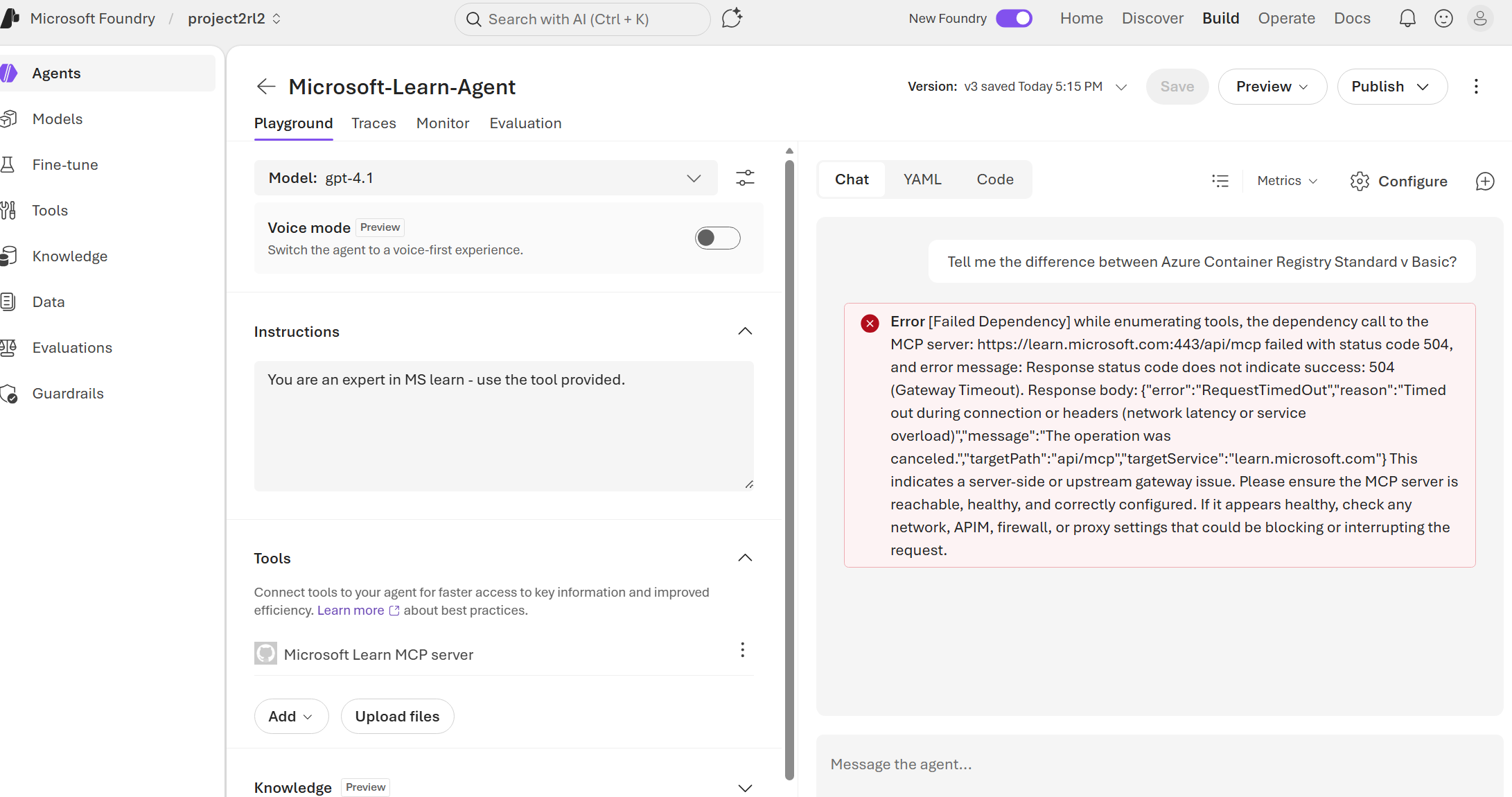
To allow it, add an FQDN outbound rule:
az cognitiveservices account managed-network outbound-rule set \
  --resource-group demo \
  --name aiservices2rl2 \
  --rule my-fqdn-rule \
  --type fqdn \
  --destination "learn.microsoft.com"
In my testing, adding an FQDN rule can take around 10-15 minutes to complete, likely due to Azure Firewall update time.
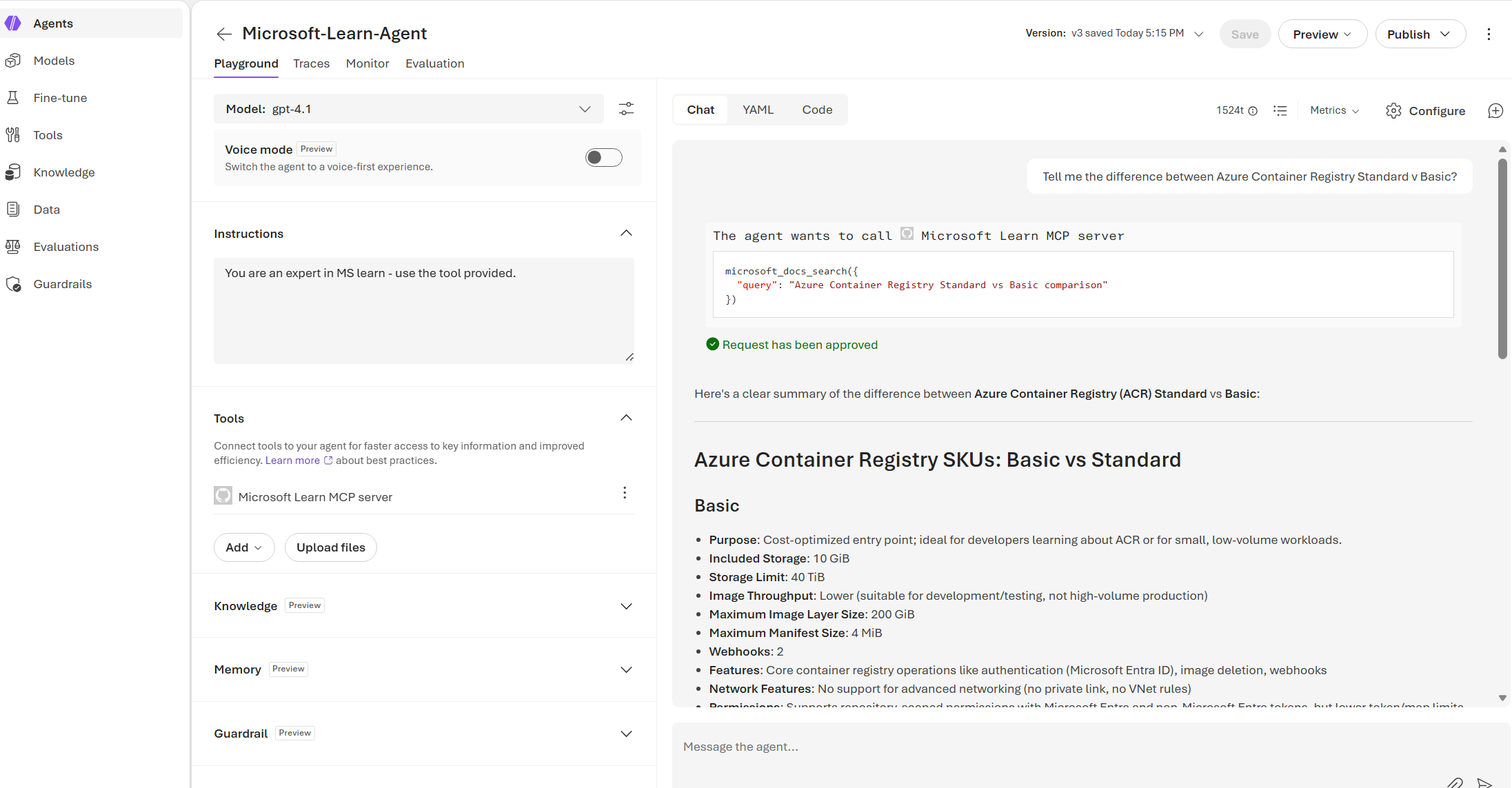
Once the rule is active, go back into Microsoft Foundry and ask the same question again. This time, we can see that it is successful.
Supported private endpoint resource types
FQDN rules are generally well supported. What about resources that support private endpoints? At the time of writing, the supported resource types include:
- Microsoft Foundry (AI Services)
- Azure Application Gateway (connects to your on-premises resources by using L4 or L7 traffic)
- Azure API Management (supports only the Classic tier without VNet injection and the Standard V2 tier with virtual network integration)
- Azure AI Search
- Azure Container Registry
- Azure Cosmos DB
- Azure Data Factory
- Azure Database for MariaDB
- Azure Database for MySQL
- Azure Database for PostgreSQL Single Server
- Azure Database for PostgreSQL Flexible Server
- Azure Databricks
- Azure Event Hubs
- Azure Key Vault
- Azure Machine Learning
- Azure Cache for Redis
- Azure SQL Server
- Azure Storage
- Azure Application Insights (via Azure Monitor Private Link Scope)
I would like to see broader support for services commonly used to expose APIs and remote MCP servers, particularly Azure Functions, Azure App Service (Web Apps), and Azure Container Apps. In theory, these can be fronted by Application Gateway and Azure API Management and exposed through private connectivity, but that will not always match the design requirements for every deployment.
Creating a managed private endpoint rule
Let’s add a managed private endpoint to another resource, in this case, a Key Vault resource.
Before adding this, ensure your Foundry resource has the Azure AI Enterprise Network Connection Approver RBAC role at the correct scope. In the reference Bicep, this is scoped at the resource group. If you need to connect to resources in other scopes, adjust accordingly.
az role assignment create \
  --assignee-object-id 7f7294c2-353d-47ae-a022-41908f71a56e \
  --assignee-principal-type ServicePrincipal \
  --role "Azure AI Enterprise Network Connection Approver" \
  --scope /subscriptions/baba41cf-c01d-4a55-b6c5-ca494b802be5
Once that is done, you can create a new outbound rule of type PrivateEndpoint, which creates the private endpoint connection and attempts approval.
az rest --method PUT --url 'https://management.azure.com/subscriptions/baba41cf-c01d-4a55-b6c5-ca494b802be5/resourceGroups/demo/providers/Microsoft.CognitiveServices/accounts/aiservices2rl2/managedNetworks/default/outboundRules/test-rule2?api-version=2025-10-01-preview' \
  --body '{
    "id": "/subscriptions/baba41cf-c01d-4a55-b6c5-ca494b802be5/resourceGroups/demo/providers/Microsoft.CognitiveServices/accounts/aiservices2rl2/managedNetworks/default/outboundRules/test-rule-str2",
    "name": "test-rule-str2",
    "type": "Microsoft.CognitiveServices/accounts/managedNetworks/outboundRules",
    "properties": {
      "type": "PrivateEndpoint",
      "destination": {
        "serviceResourceId": "/subscriptions/baba41cf-c01d-4a55-b6c5-ca494b802be5/resourceGroups/demo/providers/Microsoft.KeyVault/vaults/dddddddddddddddddadsada",
        "subresourceTarget": "vault"
      },
      "category": "UserDefined"
    }
  }'
Ensure the target resource type is supported and the subresourceTarget value is valid. If not, the error message can be unclear.
Adding a private endpoint rule often completes faster than an FQDN rule, likely because it does not require the same managed Azure Firewall update flow.
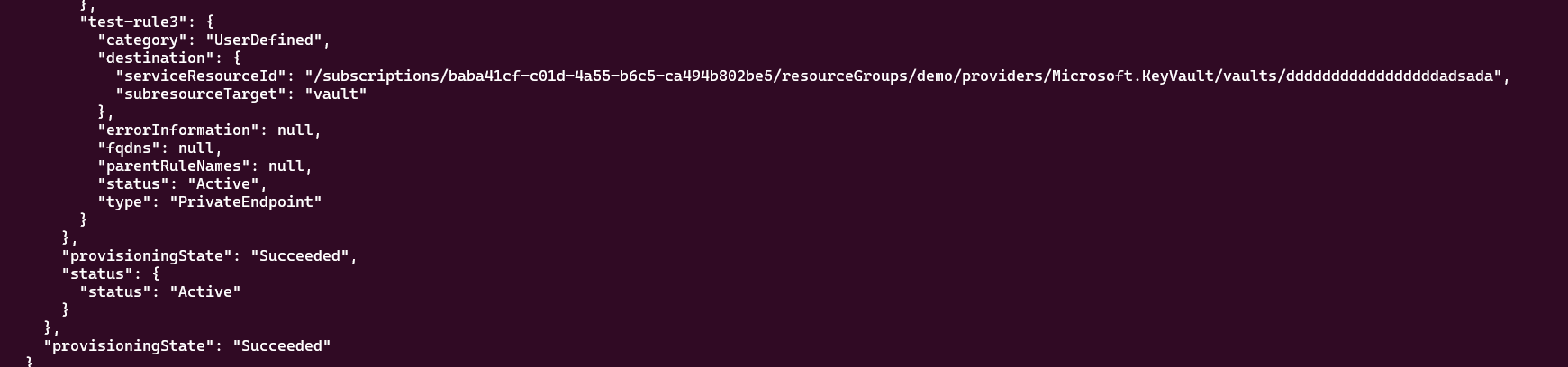
Once added, you can confirm the rule has been successfully provisioned.
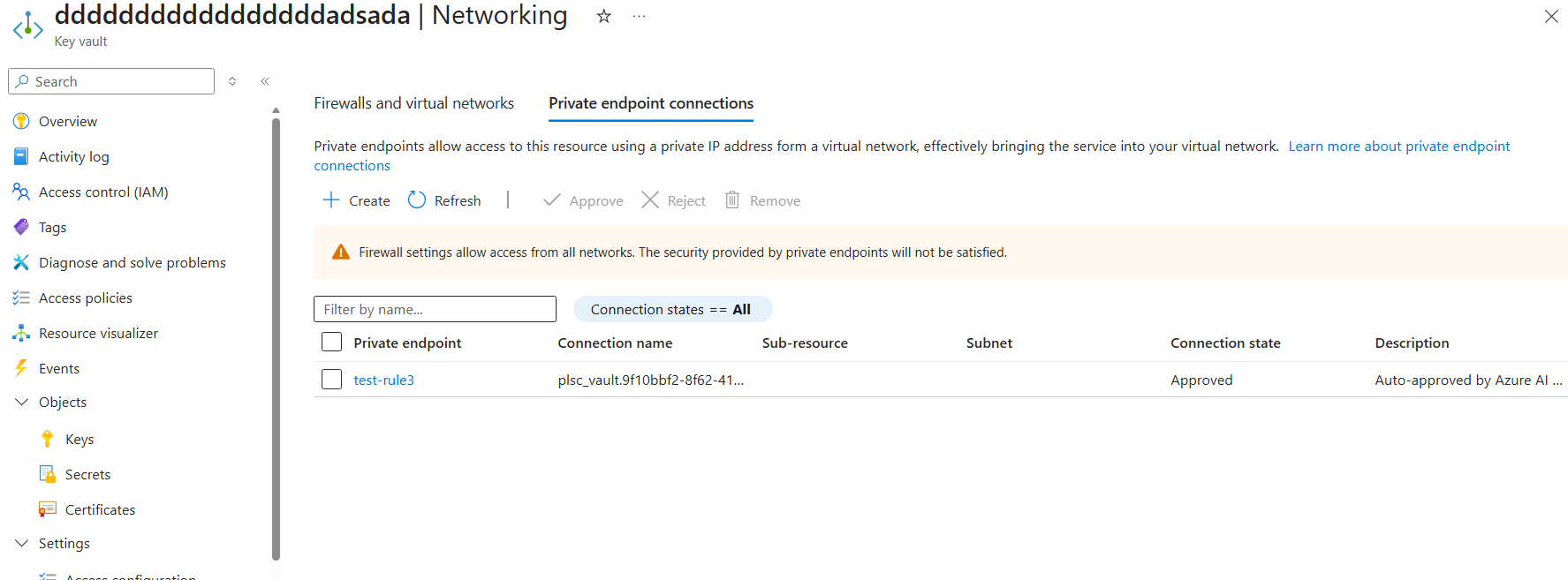
You can also verify that the private endpoint connection has been created on the target Key Vault.
A good use of this pattern would be:
- Private endpoint connection to Key Vault to store Microsoft Foundry connections.
- Private endpoint connection to Azure Container Registry for Microsoft Foundry hosted agents, so images can be pulled privately.
- Exposing tools and REST APIs to Microsoft Foundry agents. For example, a remote MCP server in Azure Container Apps exposed via APIM can be connected privately.
Summary overview
In this post, we looked at how Microsoft Foundry Managed Virtual Network (MVNet) differs from BYO-VNet and why it is a practical option when you want Microsoft-managed network isolation with controlled outbound access.
Key points:
- MVNet networking is Microsoft-managed, but you can still connect to supported private resources through private endpoint outbound rules.
- Default required outbound rules are created by the platform and should remain in place for service functionality.
- FQDN outbound rules are useful for specific internet destinations (for example,
learn.microsoft.com) when usingAllowOnlyApprovedOutbound. - Private endpoint outbound rules are often faster to provision and are better aligned for private, enterprise-grade connectivity patterns.
- RBAC scope matters: your Foundry resource needs the Azure AI Enterprise Network Connection Approver role at the correct scope for private endpoint approval workflows.
Final thoughts
MVNet gives you a strong middle ground between simplicity and control. You avoid managing VNet plumbing directly, while still enforcing strict outbound governance with Azure Firewall-backed policy and private connectivity to supported services. For production deployments, start with least-privilege outbound rules, validate each dependency early, and document your approved egress patterns so platform and application teams can scale consistently.