Invoking a custom Web API in Azure AI Search for enrichment
Hi everyone, I thought I would do another blog looking more closely at custom web APIs in Azure AI Search. We will not look at entirely securing them with authentication or anything like that, but I just wanted to show you how they work.
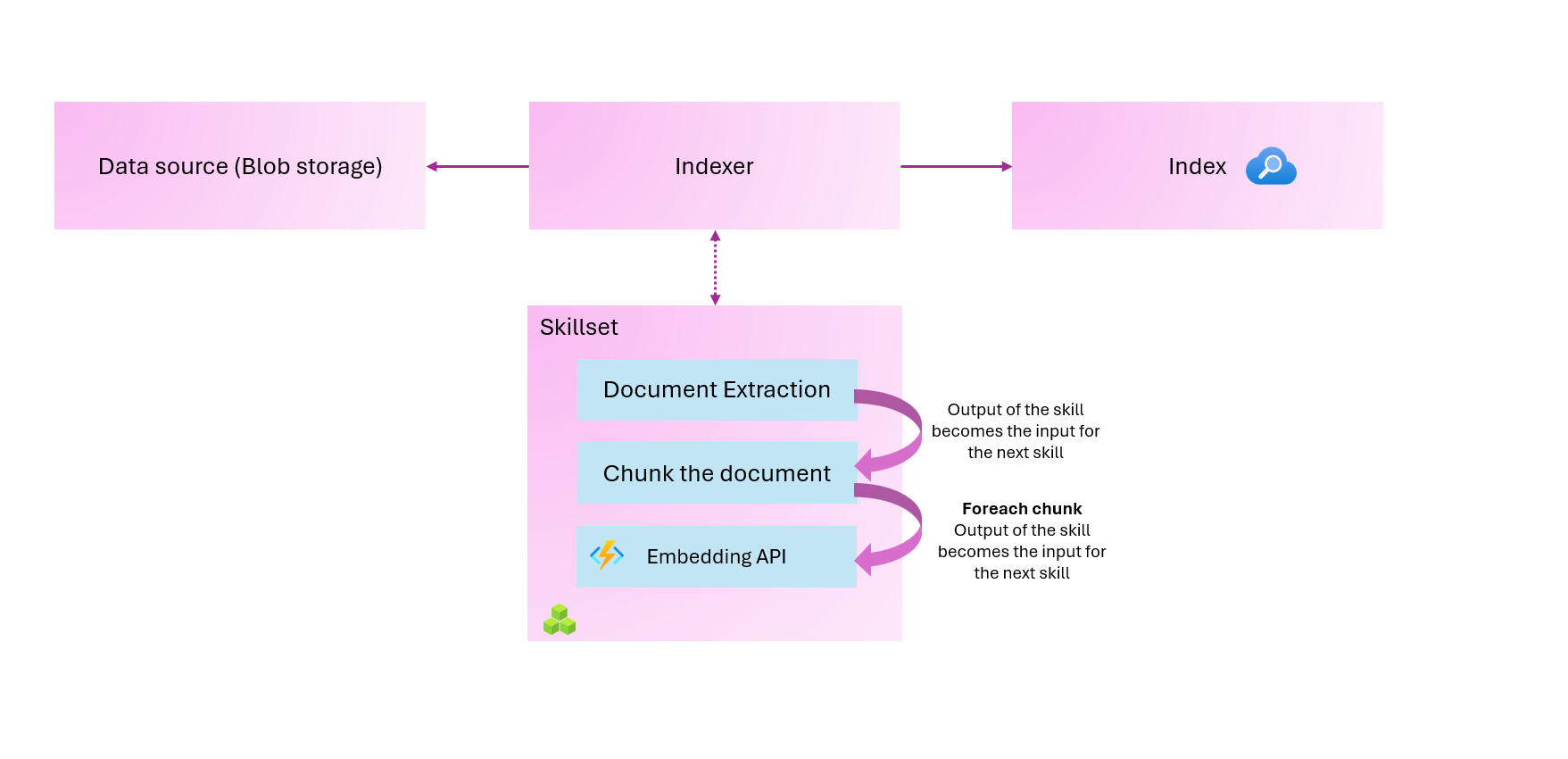
Custom web APIs can be used for almost anything. You might want to call an API to perform a specific activity, or to add more data to your search index. In our example, we will use a skillset that will do the following:
- Extract the content of the document
- Split the content into chunks
- Call a web API with those chunks to store the corresponding embeddings
Remember, everything that you see today is in my GitHub: https://github.com/georgeollis/azure-ai-search/tree/main/index-projection-example
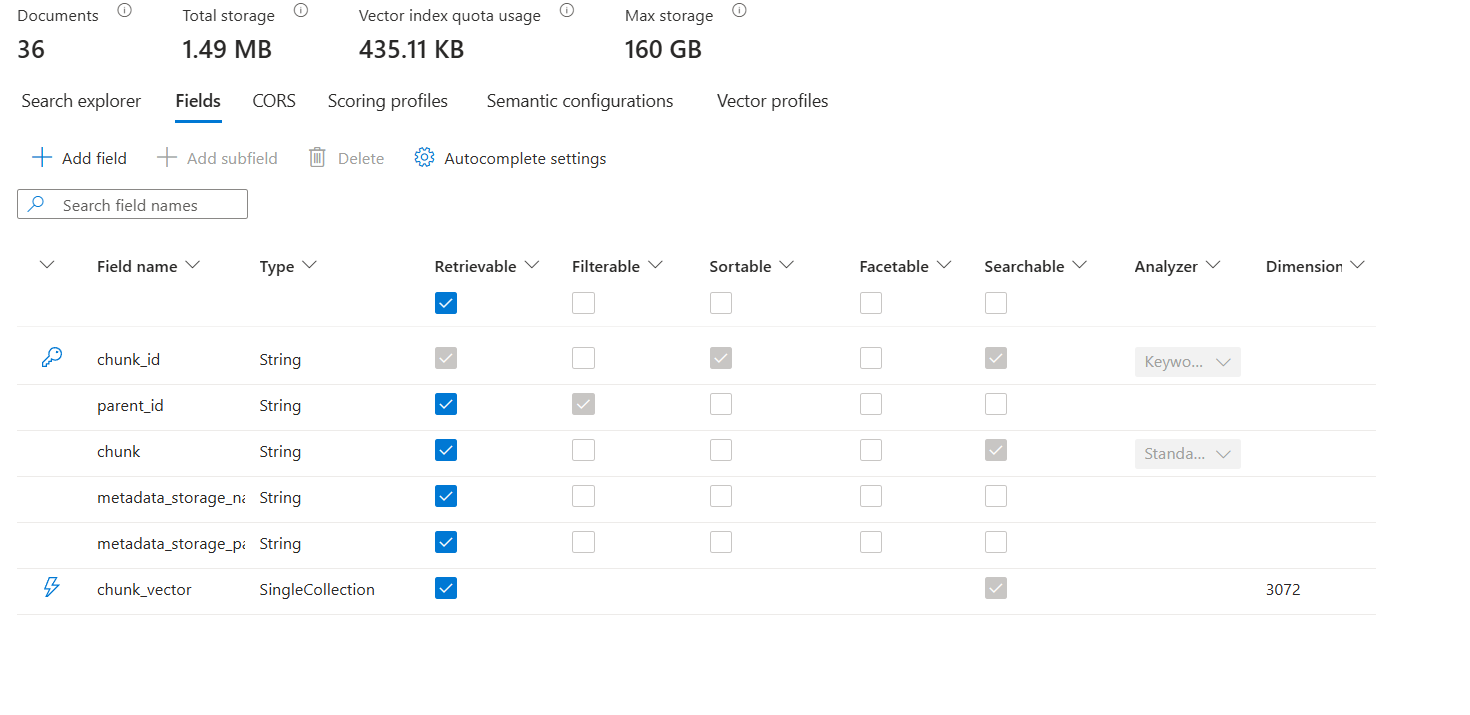
This is the configuration of our index:
Let's really focus on the SkillSet that we've defined.
{
  "@odata.etag": "\"0x8DE3A9C9B07EF67\"",
  "name": "custom-skill",
  "description": "custom-skill",
  "skills": [
    {
      "@odata.type": "#Microsoft.Skills.Util.DocumentExtractionSkill",
      "name": "text",
      "description": "",
      "context": "/document",
      "parsingMode": "default",
      "dataToExtract": "contentAndMetadata",
      "inputs": [
        {
          "name": "file_data",
          "source": "/document/file_data",
          "inputs": []
        }
      ],
      "outputs": [
        {
          "name": "content",
          "targetName": "extracted_content"
        }
      ],
      "configuration": {}
    },
    {
      "@odata.type": "#Microsoft.Skills.Text.SplitSkill",
      "name": "SplitSkill",
      "description": "A skill that splits text into chunks",
      "context": "/document",
      "defaultLanguageCode": "en",
      "textSplitMode": "pages",
      "maximumPageLength": 1000,
      "pageOverlapLength": 150,
      "maximumPagesToTake": 0,
      "unit": "characters",
      "inputs": [
        {
          "name": "text",
          "source": "/document/extracted_content",
          "inputs": []
        }
      ],
      "outputs": [
        {
          "name": "textItems",
          "targetName": "pages"
        }
      ]
    },
    {
      "@odata.type": "#Microsoft.Skills.Custom.WebApiSkill",
      "name": "EmbeddingSkill",
      "description": "Calls custom Azure Function to generate embeddings",
      "context": "/document/pages/*",
      "uri": "https://func-aisearch-customskill-eah3dggzhug3ewef.uksouth-01.azurewebsites.net/api/generate_embeddings",
      "httpMethod": "POST",
      "timeout": "PT30S",
      "batchSize": 1,
      "inputs": [
        {
          "name": "pageText",
          "source": "/document/pages/*",
          "inputs": []
        }
      ],
      "outputs": [
        {
          "name": "chunk_vector",
          "targetName": "chunk_vector"
        }
      ],
      "httpHeaders": {}
    }
  ],
  "indexProjections": {
    "selectors": [
      {
        "targetIndexName": "text",
        "parentKeyFieldName": "parent_id",
        "sourceContext": "/document/pages/*",
        "mappings": [
          {
            "name": "chunk",
            "source": "/document/pages/*",
            "inputs": []
          },
          {
            "name": "metadata_storage_name",
            "source": "/document/metadata_storage_name",
            "inputs": []
          },
          {
            "name": "metadata_storage_path",
            "source": "/document/metadata_storage_path",
            "inputs": []
          },
          {
            "name": "chunk_vector",
            "source": "/document/pages/*/chunk_vector",
            "inputs": []
          }
        ]
      }
    ],
    "parameters": {
      "projectionMode": "skipIndexingParentDocuments"
    }
  }
}
The first skill takes in the data, extracts the content, and creates a node at /document/extracted_content. This represents the content from the document. Remember that in Azure AI Search, the typical unit of work is a single file, a blob, or a row in a database. (More on this in a minute).
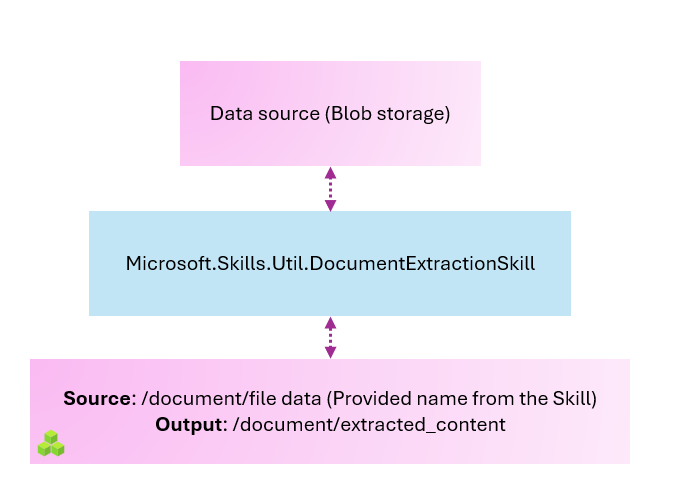
Once we have the extracted content, we would ideally like to break it into smaller pieces and send that data to our embedding model running in Azure Functions. So now we will look at how to divide the document into chunks, something along these lines.
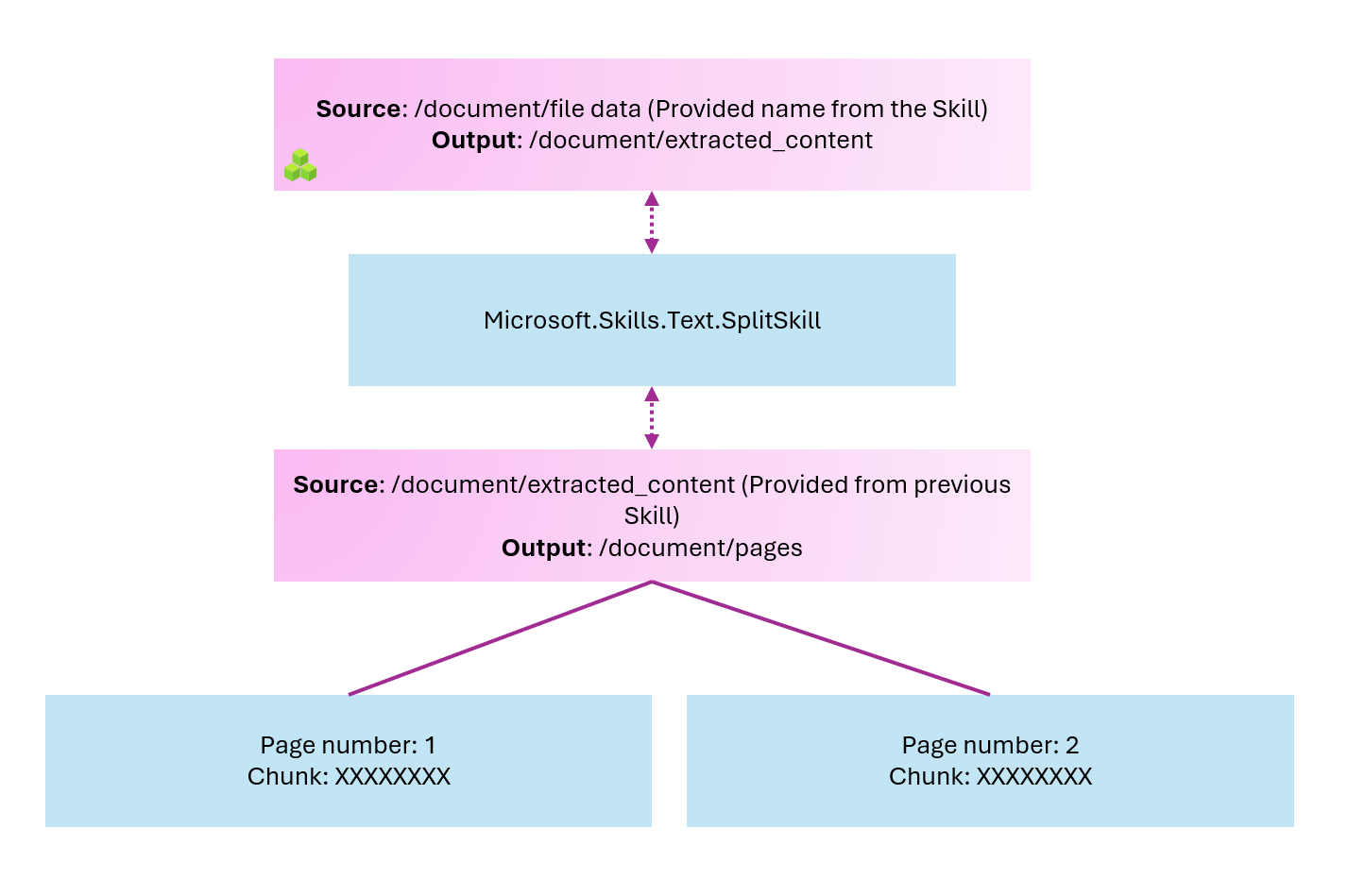
Once we've split our text into pages (chunks), we want to send them to our Azure Function that will generate the embeddings.
import azure.functions as func
import json
import logging
import os
from openai import AzureOpenAI

app = func.FunctionApp()

# Initialize Azure OpenAI client
client = AzureOpenAI(
    api_key=os.getenv("AZURE_OPENAI_API_KEY"),
    api_version=os.getenv("AZURE_OPENAI_API_VERSION", "2024-02-01"),
    azure_endpoint=os.getenv("AZURE_OPENAI_ENDPOINT")
)

@app.route(route="generate_embeddings", methods=["POST"], auth_level=func.AuthLevel.ANONYMOUS)
def generate_embeddings(req: func.HttpRequest) -> func.HttpResponse:
    logging.info('Azure AI Search generate embeddings function triggered.')

    try:
        # Parse the request body
        req_body = req.get_json()

        # Validate the request has the required 'values' array
        if 'values' not in req_body:
            return func.HttpResponse(
                json.dumps({"error": "Request must contain 'values' array"}),
                status_code=400,
                mimetype="application/json"
            )

        # Process each record in the values array
        results = {"values": []}

        for record in req_body.get('values', []):
            record_id = record.get('recordId')
            data = record.get('data', {})
            text = data.get('pageText', '')

            try:
                # Generate embeddings using Azure OpenAI
                response = client.embeddings.create(
                    input=text,
                    model=os.getenv("AZURE_OPENAI_EMBEDDING_MODEL", "text-embedding-3-large")
                )

                # Extract the embedding vector
                chunk_vector = response.data[0].embedding

                # Process the record and generate output
                output_record = {
                    "recordId": record_id,
                    "data": {
                        "chunk_vector": chunk_vector
                    },
                    "errors": None,
                    "warnings": None
                }
            except Exception as e:
                logging.error(f"Error generating embedding for record {record_id}: {e}")
                output_record = {
                    "recordId": record_id,
                    "data": {
                        "chunk_vector": None
                    },
                    "errors": [{"message": str(e)}],
                    "warnings": None
                }

            results["values"].append(output_record)

        # Return the response in the correct format
        return func.HttpResponse(
            json.dumps(results),
            status_code=200,
            mimetype="application/json"
        )

    except ValueError as e:
        logging.error(f"Invalid JSON in request: {e}")
        return func.HttpResponse(
            json.dumps({"error": "Invalid JSON"}),
            status_code=400,
            mimetype="application/json"
        )
    except Exception as e:
        logging.error(f"Error processing request: {e}")
        return func.HttpResponse(
            json.dumps({"error": str(e)}),
            status_code=500,
            mimetype="application/json"
        )
What we are doing now is looping. For each page, we send it to our Azure Function. The Azure Function expects Azure AI Search to provide a record ID and a data object containing our chunks. We specify that the property will be calledpageText, which will hold those chunks. In the Python code, we then fetch that attribute and attempt to generate embeddings.
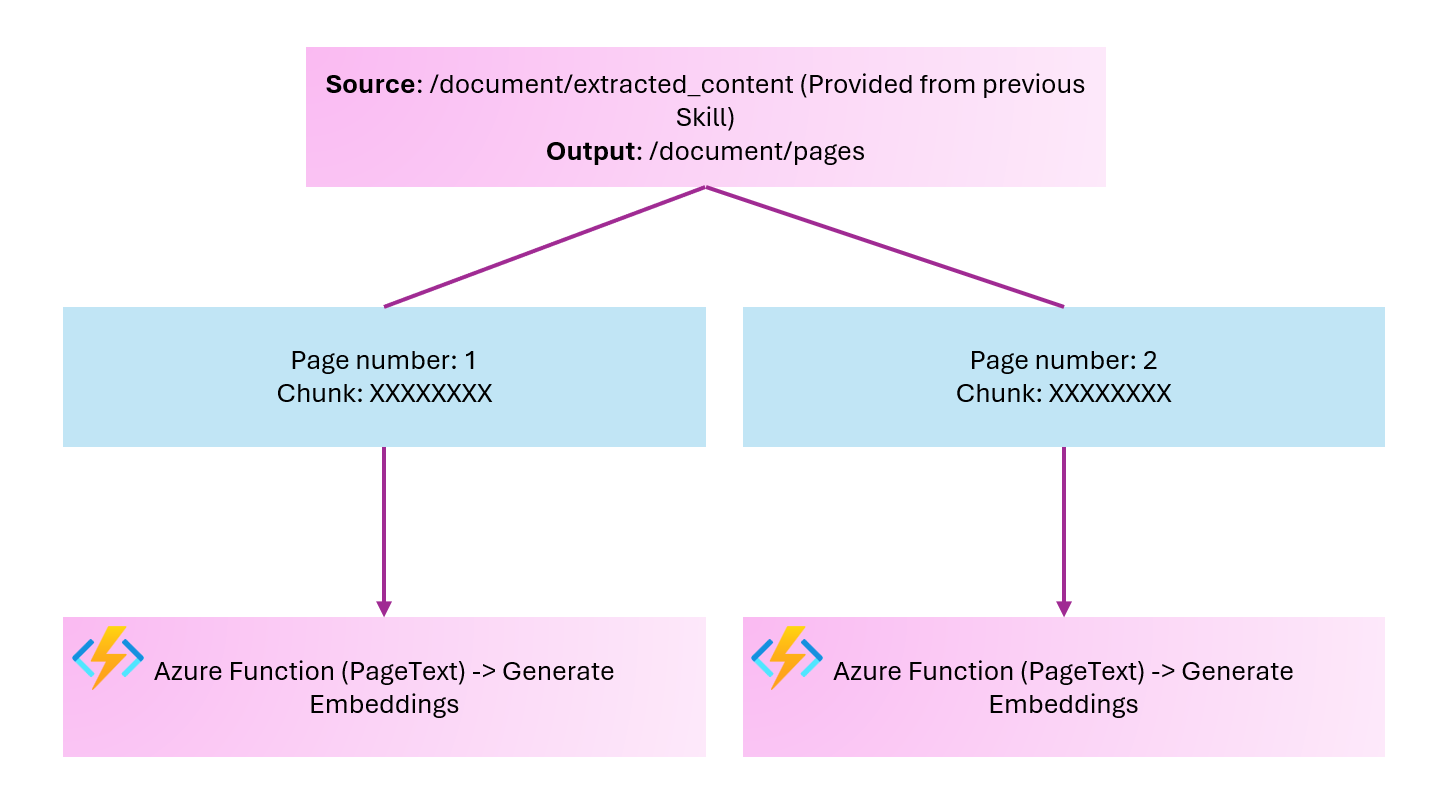
Because we now have a one-to-many relationship in our index, we need to use index projections rather than output field mappings in the indexer. For example, one document is generating multiple records as a result of chunking.
An index projection is defined within a skillset. It coordinates the indexing process by sending chunks of content to the search index together with the parent content associated with each chunk. More info here: https://learn.microsoft.com/en-us/azure/search/search-how-to-define-index-projections?tabs=rest-create-index%2Crest-create-index-projection
  "indexProjections": {
    "selectors": [
      {
        "targetIndexName": "text",
        "parentKeyFieldName": "parent_id",
        "sourceContext": "/document/pages/*",
        "mappings": [
          {
            "name": "chunk",
            "source": "/document/pages/*",
            "inputs": []
          },
          {
            "name": "metadata_storage_name",
            "source": "/document/metadata_storage_name",
            "inputs": []
          },
          {
            "name": "metadata_storage_path",
            "source": "/document/metadata_storage_path",
            "inputs": []
          },
          {
            "name": "chunk_vector",
            "source": "/document/pages/*/chunk_vector",
            "inputs": []
          }
        ]
      }
    ],
    "parameters": {
      "projectionMode": "skipIndexingParentDocuments"
    }
  }
The projection configures the relationship between the parent document and the chunks. We also skip indexing the parent documents because their content is chunked up.
The configuration maps our parent_id property in our index to our child documents. It also projects the data into the correct index name. For example, the source in our enriched document for /document/pages/* becomes a chunk in our index, etc.
When we upload data into the blob storage account and run the indexer, we can see that our index is fully populated.
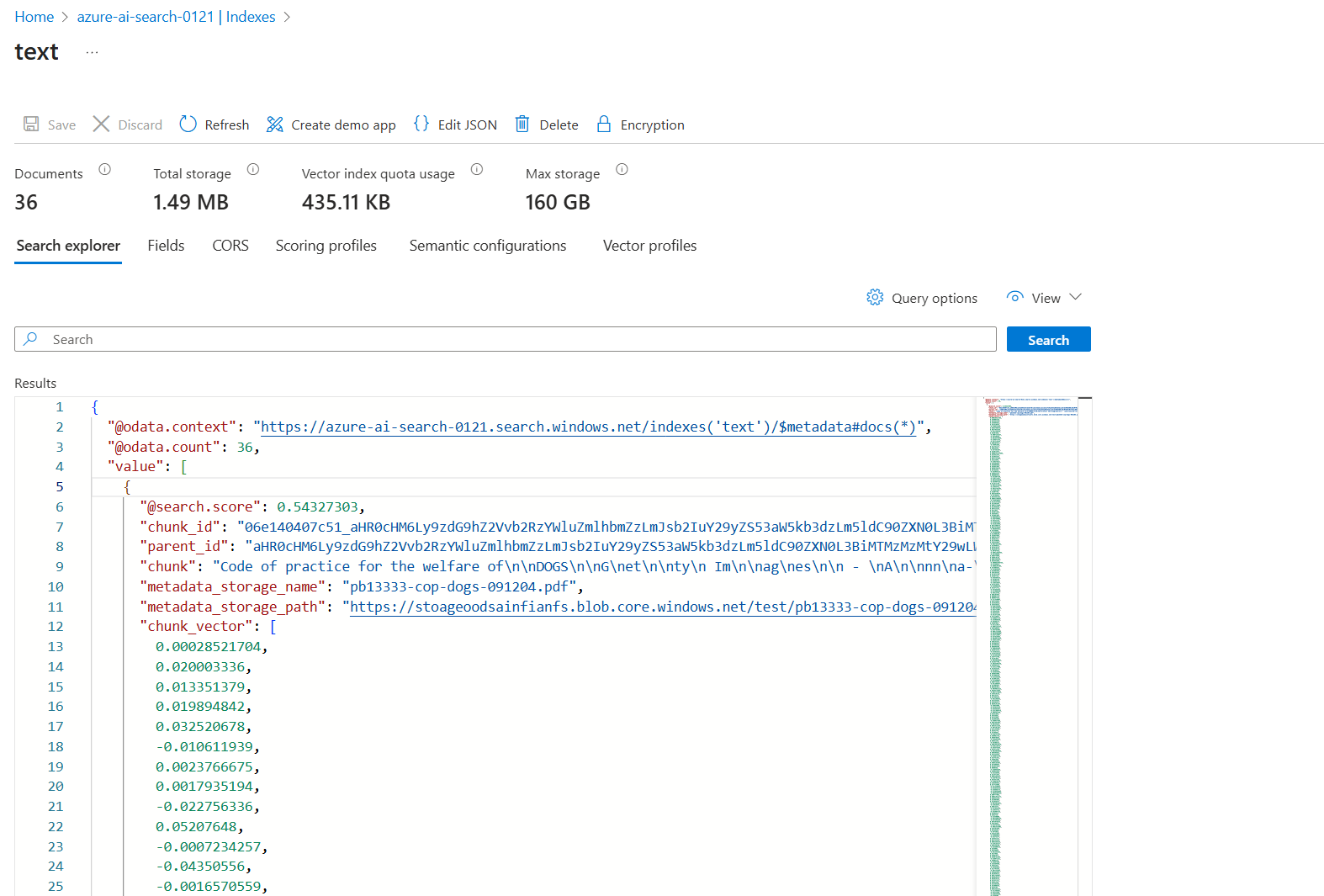
You are now ready to interact with this data, but you can see how straightforward it is to invoke custom logic in your web API. To make this solution secure, I would begin with the following steps:
- Enable Microsoft Entra ID authentication on the Azure Function
- Create a managed private endpoint in Azure AI Search for the Azure Function, ensuring connectivity remains on the Microsoft backbone, so that you do not need to expose your Azure Function to the internet.
Thanks for reading this blog!