Skillsets in Azure AI Search
First - thanks for coming to this blog. I've made a promise to myself that I'll start blogging each week again!
Many people use Azure AI Search for RAG-based applications – it’s the go-to option from Microsoft (while also supporting a range of other databases, such as Cosmos DB and Azure SQL).
In this blog post, I aim to explain the use of skillsets for AI enrichment. For example, imagine you have data stored in Azure Storage, and you want to unlock its potential: read the data, translate it, generate embeddings, or even call a custom web API. This is the power of skills.
Firstly, you don't just use skills - you use them as part of an Indexer that automates the process of pulling data from sources like SQL, Cosmos DB, or Blob Storage into the search index. It can run on demand or on a schedule, ensuring the index stays synchronised with the underlying data.
Then you have the index itself, which many people will already be familiar with. An index is a structured container that defines how searchable data is stored and queried in Azure AI Search. It specifies fields, data types, and attributes, enabling efficient full-text search, filtering, and sorting.
Let's have a look at a few examples - we will be playing with. In our example, we have a basic index and three skills in the skillset. Our skills are the following:
- Document Extraction Skill
- Translation Skill
- Custom Web API (Running in Azure Functions)
The index
{
  "@odata.etag": "\"0x8DE31DF4A2BF426\"",
  "name": "test",
  "fields": [
    {
      "name": "id",
      "type": "Edm.String",
      "searchable": false,
      "filterable": false,
      "retrievable": true,
      "stored": true,
      "sortable": false,
      "facetable": false,
      "key": true,
      "synonymMaps": []
    },
    {
      "name": "text",
      "type": "Edm.String",
      "searchable": true,
      "filterable": false,
      "retrievable": true,
      "stored": true,
      "sortable": false,
      "facetable": false,
      "key": false,
      "analyzer": "standard.lucene",
      "synonymMaps": []
    },
    {
      "name": "translation",
      "type": "Edm.String",
      "searchable": true,
      "filterable": false,
      "retrievable": true,
      "stored": true,
      "sortable": false,
      "facetable": false,
      "key": false,
      "analyzer": "standard.lucene",
      "synonymMaps": []
    },
    {
      "name": "custom_skill",
      "type": "Edm.String",
      "searchable": false,
      "filterable": false,
      "retrievable": true,
      "stored": true,
      "sortable": false,
      "facetable": false,
      "key": false,
      "synonymMaps": []
    }
  ],
  "scoringProfiles": [],
  "suggesters": [],
  "analyzers": [],
  "normalizers": [],
  "tokenizers": [],
  "tokenFilters": [],
  "charFilters": [],
  "similarity": {
    "@odata.type": "#Microsoft.Azure.Search.BM25Similarity"
  }
}
We have three fields in our index - to make this as easy to understand as possible.
The indexer
{
  "@odata.context": "https://XXX.search.windows.net/$metadata#indexers/$entity",
  "@odata.etag": "\"0x8DE31E0F56BFAA1\"",
  "name": "indexer-1764675508872",
  "description": null,
  "dataSourceName": "azureblob-1764675114745-datasource",
  "skillsetName": "custom-skill",
  "targetIndexName": "test",
  "disabled": null,
  "schedule": null,
  "parameters": {
    "batchSize": null,
    "maxFailedItems": null,
    "maxFailedItemsPerBatch": null,
    "configuration": {
      "allowSkillsetToReadFileData": true,
      "parsingMode": "text",
      "dataToExtract": "contentAndMetadata"
    }
  },
  "fieldMappings": [],
  "outputFieldMappings": [
    {
      "sourceFieldName": "/document/extracted_content",
      "targetFieldName": "text",
      "mappingFunction": null
    },
    {
      "sourceFieldName": "/document/translatedContext",
      "targetFieldName": "translation",
      "mappingFunction": null
    },
    {
      "sourceFieldName": "/document/custom_skill",
      "targetFieldName": "custom_skill",
      "mappingFunction": null
    }
  ],
  "cache": null,
  "encryptionKey": null
}
In this indexer, we’ve configured several settings within the parameters object. For example, we’ve set allowSkillsetToReadFileData totrue, which enables our skillsets to access the data in the storage account. We’ve also set the parsing mode to text and specified that the data to be extracted is the file's content, along with any supporting metadata (which we are not using in this example).
Skillset
{
  "@odata.etag": "\"0x8DE31E0F56F9FF5\"",
  "name": "custom-skill",
  "description": "",
  "skills": [
    {
      "@odata.type": "#Microsoft.Skills.Util.DocumentExtractionSkill",
      "name": "text",
      "description": "",
      "context": "/document",
      "parsingMode": "default",
      "dataToExtract": "contentAndMetadata",
      "inputs": [
        {
          "name": "file_data",
          "source": "/document/file_data",
          "inputs": []
        }
      ],
      "outputs": [
        {
          "name": "content",
          "targetName": "extracted_content"
        }
      ],
      "configuration": {}
    },
    {
      "@odata.type": "#Microsoft.Skills.Text.TranslationSkill",
      "name": "translate",
      "description": "translate",
      "context": "/document",
      "defaultToLanguageCode": "fr",
      "suggestedFrom": "en",
      "inputs": [
        {
          "name": "text",
          "source": "/document/extracted_content",
          "inputs": []
        }
      ],
      "outputs": [
        {
          "name": "translatedText",
          "targetName": "translatedContext"
        }
      ]
    },
    {
      "@odata.type": "#Microsoft.Skills.Custom.WebApiSkill",
      "name": "myCustomSkill",
      "description": "This skill calls an Azure function",
      "context": "/document",
      "uri": "https://func-custom-skill-c9h4b3h9bedcaddv.uksouth-01.azurewebsites.net/api/custom_skillset",
      "httpMethod": "POST",
      "timeout": "PT30S",
      "batchSize": 1000,
      "inputs": [
        {
          "name": "text",
          "source": "/document/extracted_content",
          "inputs": []
        }
      ],
      "outputs": [
        {
          "name": "message",
          "targetName": "custom_skill"
        }
      ],
      "httpHeaders": {}
    }
  ],
  "cognitiveServices": {
    "@odata.type": "#Microsoft.Azure.Search.AIServicesByKey",
    "key": "<redacted>",
    "subdomainUrl": "https://XXX.cognitiveservices.azure.com/"
  }
}
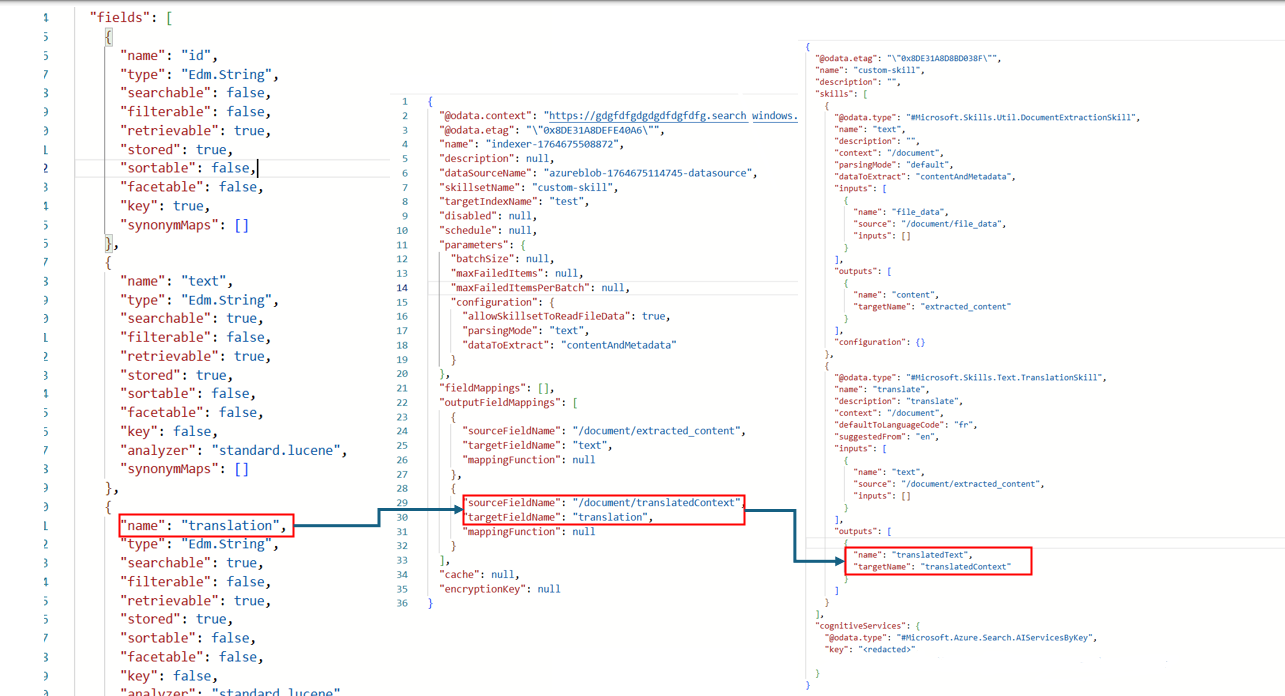
The JSON representation of this can be a little confusing, as a lot is going on. You have the index, indexer, and skillset files, and you need to ensure that the output from some of them correlates with the correct field. For example, the indexer has output mappings for targetName that should correspond with the field within your index.
The relationship
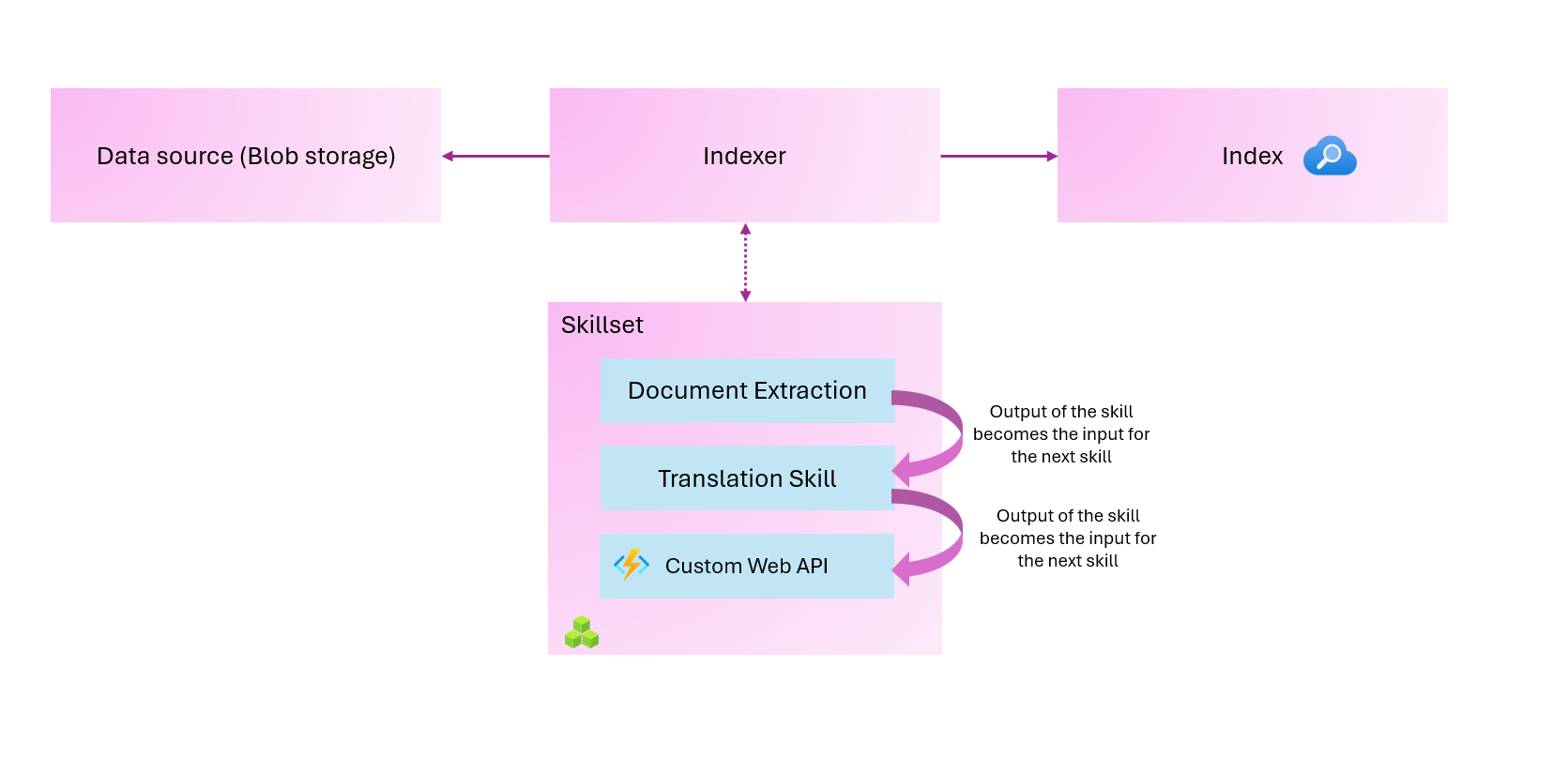
This is a high-level overview of the relationships among the components. Again, this is pretty simplified, but hopefully you’ll start to understand.
The question I kept asking myself was – What is a document? It appears everywhere.
Skills read from and write to an enriched document tree that exists in memory. Initially, an enriched document is just the raw content extracted from a data source (articulated as the “/document” root node). With each skill execution, the enriched document gains structure and substance as each skill writes its output as nodes in the graph.
After skillset execution is complete, the output of an enriched document is routed to an index through user-defined output field mappings.
At a high level, this is what we are achieving.
So, let’s see this in action. I’ve already created my resources in Azure: my index, my indexer, my skill set, and my custom web API, which runs in Azure Functions. You can find this code in my GitHub repository, available here: https://github.com/georgeollis/azure-ai-search
I’ll begin by uploading files to my Azure Storage account. These files are not important, but they contain interesting animal facts written in English. What we should expect at the end of this process is that we extract the text from the documents, translate the text into French, and then call a custom web API (which returns a “Hello World” response).
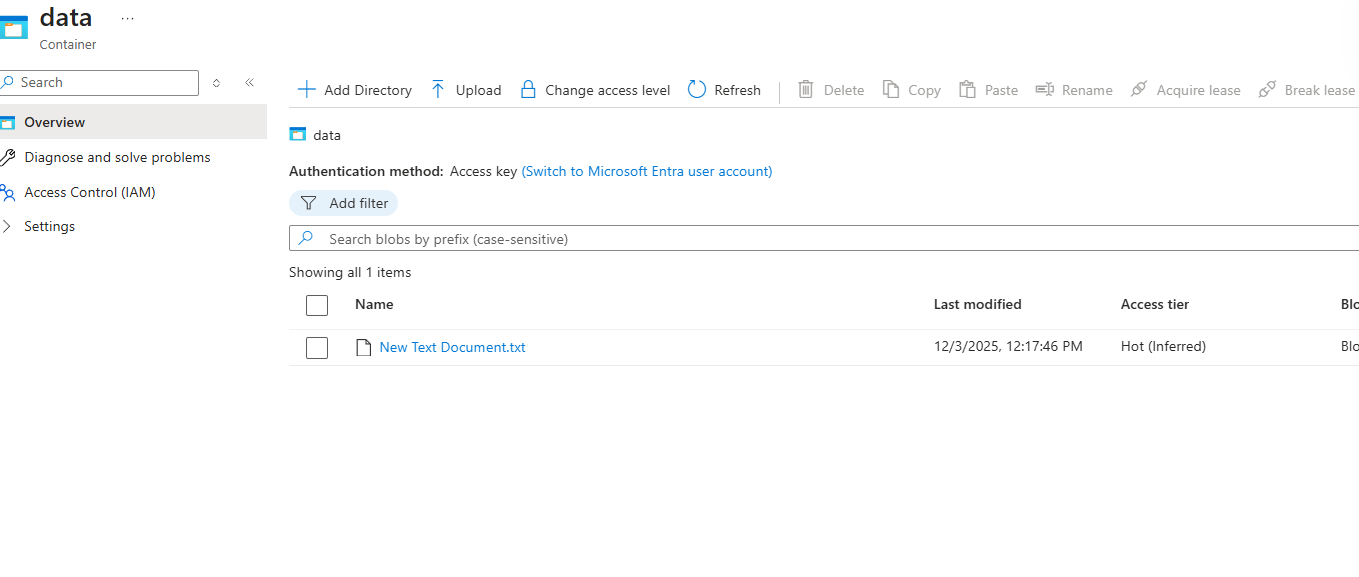
This text document has the following:
File 1 – The Secret Life of Otters Otters are the river’s comedians, slipping through the water with a grin that seems almost human. They juggle pebbles as if practising for a circus act, and their dens—called holts—are tucked away like hidden theatres. Watching them tumble and play, you’d swear they were rehearsing a routine for an audience of reeds and dragonflies.Now let's run our indexer. The indexer is set to run manually, but it can be configured to run on a defined schedule.
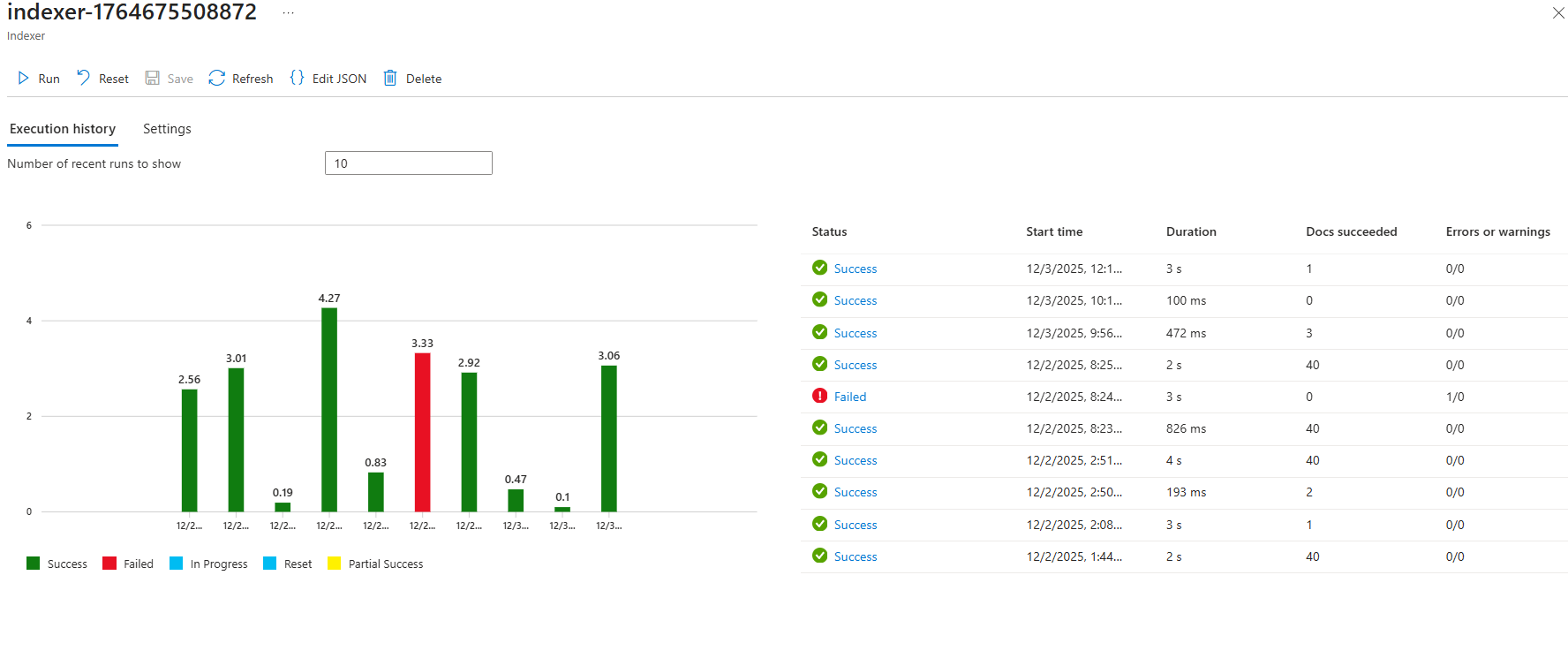
Now, going back to the index, we can clearly see that it was successful and that the index was populated, and it did the following:
- Extracted the text from the document
- Translated the text from English to French
- Called a custom web API, which returned hello world
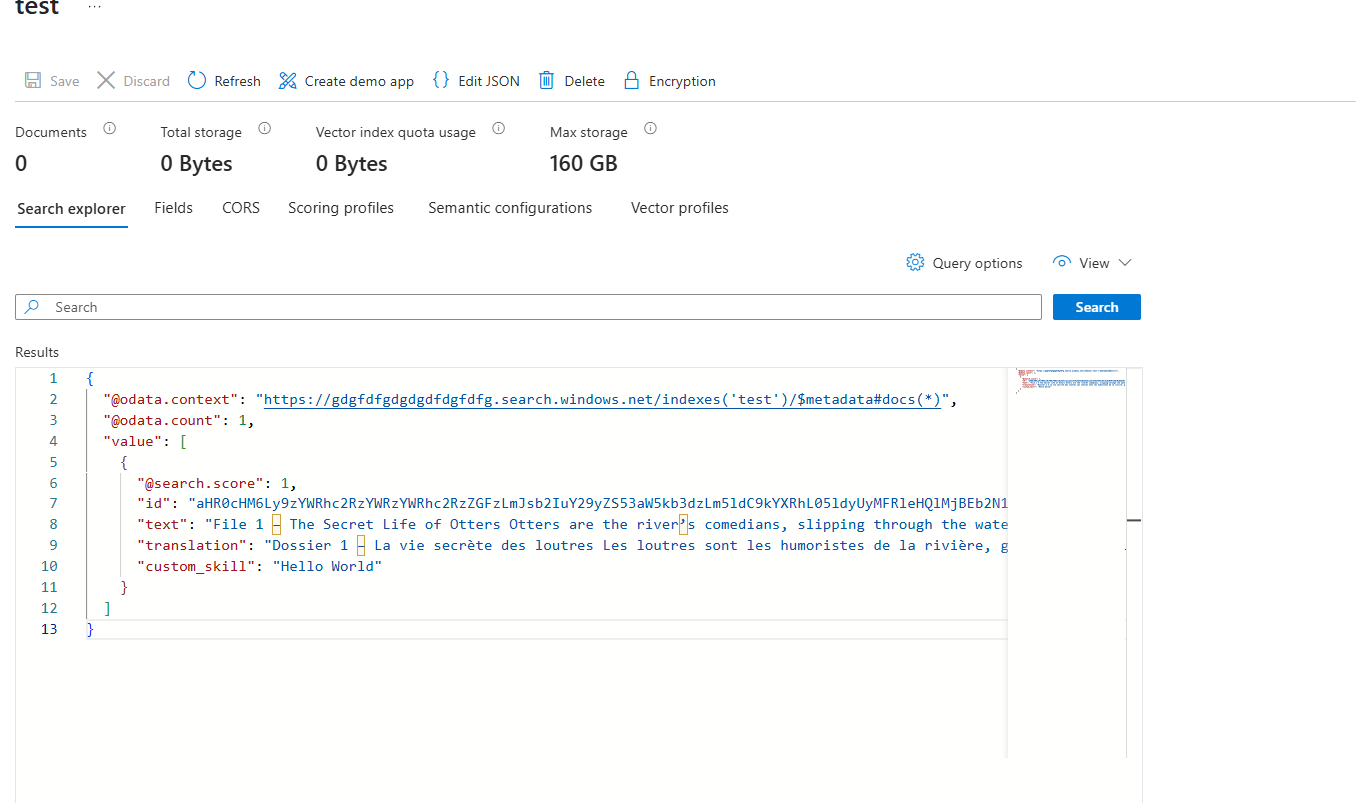
{
  "@odata.context": "https://gdgfdfgdgdgdfdgfdfg.search.windows.net/indexes('test')/$metadata#docs(*)",
  "@odata.count": 1,
  "value": [
    {
      "@search.score": 1,
      "id": "aHR0cHM6Ly9zYWRhc2RzYWRzYWRhc2RzZGFzLmJsb2IuY29yZS53aW5kb3dzLm5ldC9kYXRhL05ldyUyMFRleHQlMjBEb2N1bWVudC50eHQ1",
      "text": "File 1 – The Secret Life of Otters Otters are the river’s comedians, slipping through the water with a grin that seems almost human. They juggle pebbles as if practising for a circus act, and their dens—called holts—are tucked away like hidden theatres. Watching them tumble and play, you’d swear they were rehearsing a routine for an audience of reeds and dragonflies.\n",
      "translation": "Dossier 1 – La vie secrète des loutres Les loutres sont les humoristes de la rivière, glissant dans l’eau avec un sourire presque humain. Ils jonglent avec des cailloux comme s’ils s’entraînaient pour un numéro de cirque, et leurs tanières — appelées holts — sont cachées comme des théâtres cachés. Les regardant tomber et jouer, on aurait juré qu’ils répétaient une routine devant un public de roseaux et de libellules.\n",
      "custom_skill": "Hello World"
    }
  ]
}
Hopefully, you can now see why skillsets and indexers are so important in Azure AI Search. They allow you to transform the data, and the best part is you don’t even need to write any complex logic, especially around the ingestion of documents – just let the indexer take care of removing items from the index when documents are deleted.
Thanks for reading this blog!